
|
|
Microsoft License Only |
BEMO Managed Services | ||
| BEMO Managed Security | BEMO Managed Helpdesk | BEMO Managed Compliance | ||
|
Availability Options |
Mon-Fri 8 AM-8 PM |
Mon-Fri 8 AM-8 PM Mon-Fri 24/5 Mon-Sun 24/7 |
Mon-Fri 8 AM-8 PM Mon-Fri 24/5 Mon-Sun 24/7 |
Mon-Fri 8 AM-8 PM |
|
Scope Definition |
|
|
|
|
|
Dedicated Team |
BEMO does not provide a dedicated CSM or service team |
Dedicated Security Engineers + Dedicated CSM |
Faster Response Support Team + Dedicated CSM |
Dedicated Compliance Engineers + Dedicated CSM |
Support is not available when BEMO holidays are observed (New Year’s Eve and Day, and Christmas Eve and Day).
GCC High Holidays:
| HOLIDAY | DATE |
|
New Year's Day |
January 01 |
|
Martin Luther King Day |
January 19 |
|
Memorial Day |
May 25 |
|
Juneteenth |
June 19 |
|
Observing Independence Day |
July 03 |
|
Labor Day |
September 07 |
|
Thanksgiving Day |
November 26 |
|
The day after Thanksgiving |
November 27 |
|
Christmas Eve |
December 24 |
|
Christmas Day |
December 25 |
|
New Year's Eve |
December 31 |
To get support with BEMO, we recommend using our Helpdesk Portal, which is available on our website: https://www.bemopro.com/support. Customers can submit tickets via the portal, call BEMO’s helpdesk, or submit an email. Customer points of contact can manage the organization’s tickets via the helpdesk portal.
Best Practices on Submitting a Ticket
- PORTAL
Create a Ticket via the Helpdesk Portal – this is our preferred way.
Using the portal allows you to view Knowledge base articles and use your signed-in user details so that you don’t have to provide contact information each time. It also allows you to set the business impact (severity) on your organization.
Entering as many details as possible, attaching screenshots or images, and entering error messages is the fastest way for us to resolve your problem.
How to Use BEMO's Help Desk Portal
BEMO's Help Desk on the BEMO website is an incredibly useful tool to not only submit problems, questions, and suggestions but also for you to search our Knowledge Base which is updated every month and for you to learn any announcements we may have to share.
How do I get to the Help Desk?
Go to support.bemopro.com
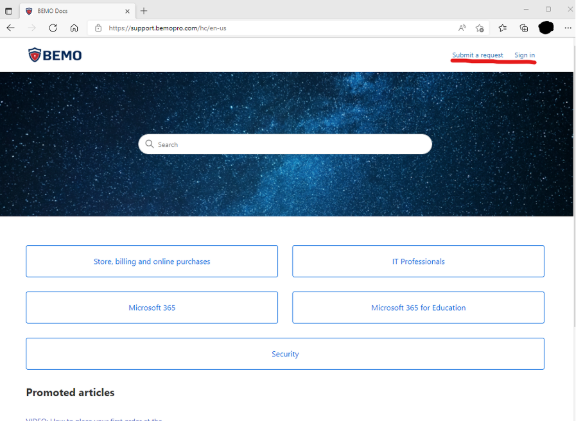
Already have an account?
If you already have an account from your previous experience submitting tickets with us, please log into your account by clicking Sign in.
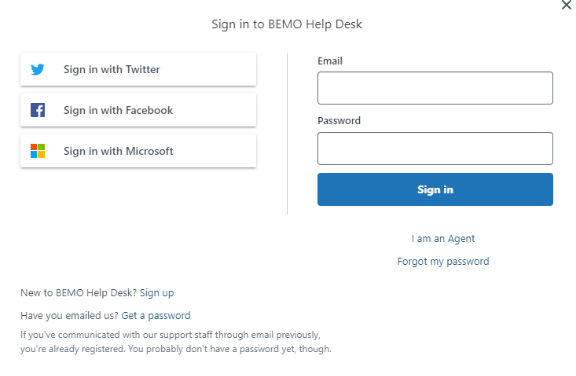
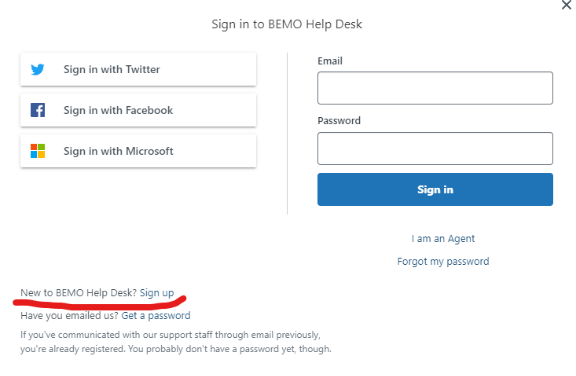
New to Help Desk?
If you don't have an account, please click on Sign up underneath "New to BEMO Help Desk?"
Then enter the following and you will receive a welcome email from us to verify your email address.
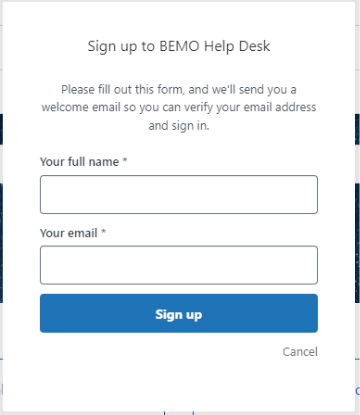
Your Help Desk Account
Once you're in your account, you can do a few things. You can setup your account profile, look at your requests, look at your activities, update your contact details, search the knowledge base, or submit a ticket.
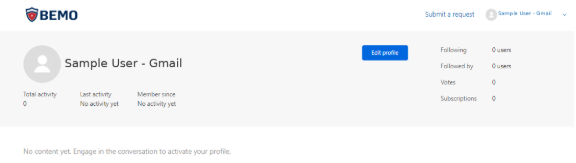
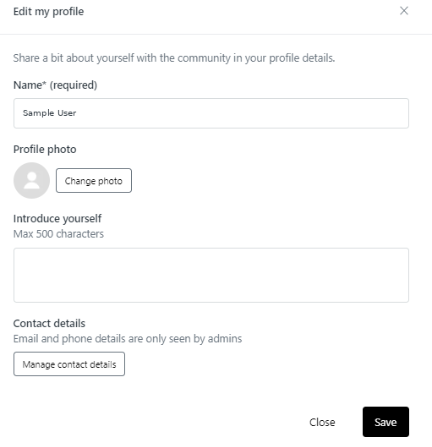
Edit your profile
You can edit your name, upload your picture, add an introduction description, and update your contact information.
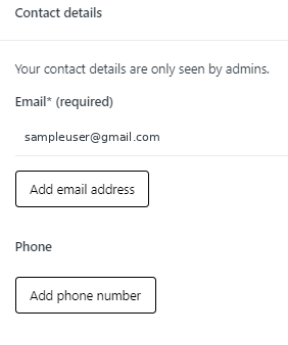
Manage contact details
In the Manage contact details, you can update your email address, add another email address, or add a phone number.
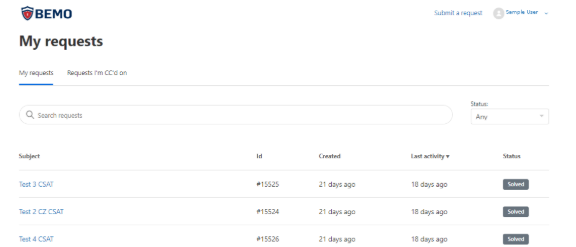
Viewing Tickets / Requests
You can view your own requests that you have submitted and their status. You can also see requests you've been CC'ed on.
Submitting a request
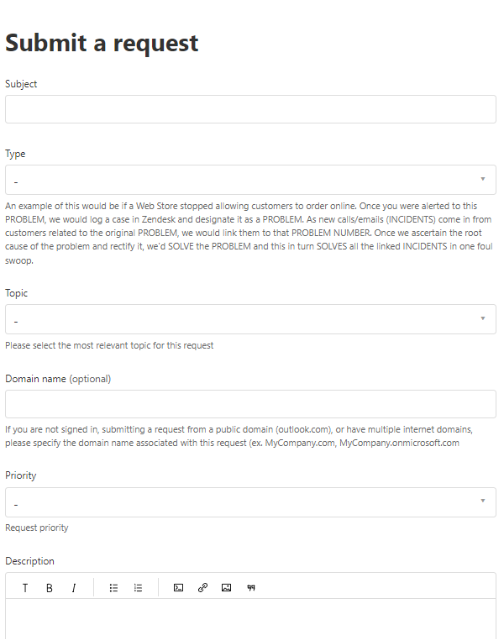
If you submit a ticket or request via the Help Desk Portal, there are far more options you can choose from to better detail your issue or question. It also helps us track the priority, the root cause, and the category better so that we can assist you faster and more efficiently.
If you are not familiar with the fields, here is a description of what is expected:
- Subject: This is the title or subject of your ticket problem / question / request.
- Type: This is a drop down of what the request is categorized as.
- Topic: This is a drop down list of what kind of a topic this ticket goes under.
- Support: Typically if you need a problem fixed, you have a new request for support to handle, or if you have a question on a function or service.
- Customer Success: If you want to get in touch with your Customer Success Manager about a license, subscription, a new business goal or objective, or if you have some broader training questions.
- Billing: If you want to get in touch with our billing department about an invoice, if you have questions around the BEMO Store, or if you have an update for your billing with us, you would select Billing.
- Domain name (optional): If you are not signed in with your regular account (if you're submitting this request from elsewhere), please enter the domain so that we can associate the request to the appropriate account.
- Priority: This is an important field to enter for us as it guides our triage as well.
- Urgent: This is a system down type of priority impacting majority of users.
- High: This is a critical process that is impacting more than one user,
- Normal: A regular request to add devices, users, update a user, problems that are impacting one user or non-critical process, a problem that has a workaround, etc.
- Low: A question about a functionality, request for documentation or process, how to questions, and non-urgent items.
- Description: This is where you describe your issue or question. Put as much detail as possible so that engineers can resolve your ticket efficiently.
- Attachments: Attach files such as sample screenshots of errors, extract reports, etc.
- EMAIL
Create a Ticket via Email (email service@bemopro.com) – this is our second preference.
Entering as many details as possible, attaching screenshots or images, and entering error messages is the fastest way for us to resolve your problem.
Since you are submitting by email, contact information is always helpful so that we can quickly verify we have the right user.
Confirming what kind of business impact this is on your organization is also something you should identify.
- PHONE CALL
Call us (+1 702 529 0820 and follow the voice prompt to get to technical support)
Calling us is great for urgent issues, however, if we are on multiple calls, please leave a voicemail, and it will automatically create a ticket for you. Leave your name, number, and the organization you’re with. Using the helpdesk portal also allows you to create urgent tickets, and it will flag us immediately.
Response Time Guidelines
The below table describes our response time goals and examples of scope.
|
Priority |
Initial Response |
Business Impact |
Example |
|
Urgent |
<1 Hour |
Business Emergency or Critical Business Impact |
|
|
High |
<1 Hour |
Moderately High Business Impact |
|
|
Normal |
<1 Hour |
Minimal Business Impact
|
|
|
Low |
<1 Hour |
No Business Impact |
Best Practices on Help Desk Portal
We have created a Knowledge Base Article on how to use our help desk portal to ensure you have all the information you need and understand the fields.
Escalation Paths
If you are not getting the response or update you are expecting, please note the following process:
- Update the ticket with your concern so that the ticket’s Support Engineer assigned is aware and can take action.
- Contact the Engineering Services Manager (by email or phone) if you are still not getting positive results from Step 1.
- Contact the Senior Director of Operations if you are still not getting positive results from Step 2.
|
Step |
Contact |
How to reach them |
|
Step 1 |
Assigned Support Engineer |
Update your ticket in the BEMO Help Desk portal |
|
Step 2 |
Engineering Services Manager |
Reach out to your assigned CSM for contact details |
|
Step 3 |
Cindy Oliveto, Senior Director of Operations |
Reach out to your assigned CSM for contact details |
Third-Party Line of Business Application Support
BEMO will provide the following, limited support of third-party, line of business applications as follows:
- BEMO’s support is limited to supporting the end-user and their interactions with the third-party application providers. In addition, because BEMO does not develop or provide these applications, BEMO cannot guarantee 100% successful resolution.
- BEMO will make every reasonable effort to assist the end-user in reaching a resolution with the application provided on a best-efforts basis.
- BEMO is not responsible for supporting the functionality of the application.
- The Customer is responsible for ensuring they have access to support for the line of business applications agreed upon at the time of contract or onboarding that are not part of the Microsoft 365 suite of applications used via licenses purchased from BEMO.
- New applications not listed in the SOW will require review and acceptance by BEMO to be added as a supported, third-party line of business application.